Thursday, August 21, 2008

Tree Froggy Fully Description


TITLE OF SYMBOL : A TREE FROG

AREA OF GLOBAL WARMING : ‘SAFE THE FROG!


Description

The Tree Frog is typically found in trees or other high-growing vegetation. They do not normally descend to the ground, except for mating. Tree frogs are usually small, as their weight has to be carried by the branches and twigs of their habitat. The back color of tree frogs is typically a vivid green, giving an excellent camouflage depending on the particular kind of vegetation they inhabit and what predators they have to hide away from. Many tree frogs can change their color to a remarkable extent. Thus when resting on bark, they are usually brownish grey.

Ideation

I choose to make this tree frog because it represents frogs that actually become extinct due to global warming. So, my idea is to make other people realize that the world will lose some species that really unique in this world. Instead, I become inspire in choosing the tree frog as my reference because it looks cute and got the attraction for other people to appreciate the beauty of this so called ‘The Tree Frog’.


References

1) Rainforest Adventure


4) Animal Evolved

(animal.kukuchew.com/)

Wednesday, August 20, 2008

Fully Sticky Froggy Step-By-Step

Dear My Work Station,

Finally I've completed my Assignment 2...
Today evening, I went to see Mdm Ling to comment my work...
And then, she asked me to edit some part of it...
I did edit after she told me to do so..
then now, this is the final result...
and also the making steps for it...


----------------------------------------------------------------------------------
STEPS-BY-STEPS!!!


1) REFERENCE, SKETCH and IDEATION

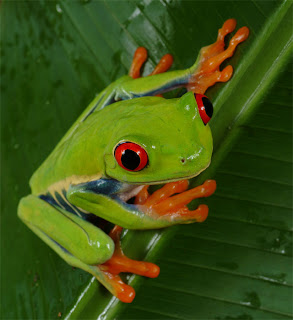
-the reference image i got it from the internet...
-I give a sketch first to see the rough idea that I want to do for this assignment 2...
-My reference image-

-My Sketch of Ideation-

------------------------------------------------------------------------------
2) TRACING and BASIC COLOUR

-I used the reference image as the template for it...
-by using the pen tool, I create the outline for it by following the reference image...
-then, I put the basic colour for each part of the frog by using the eye drop tool to make it almost similar as the original frog because I try to make it look a bit realistic...


-outline based on the reference image-


-try to complete the sketch and the colour-

-complete outline sketch-

-trying to put colour using eye drop tool-

-basic colour complete-


-----------------------------------------------------------------------------------
3) EDIT THE FROG

-I'm using the gradient tool for the colour adjustment for some part of it...
- at certain part, I used the mesh tool to make it look accurate and realistic..
- with mesh tool, I can change certain point with certain colour that I want to make it looks like blend colour eventhough it is not a blend tool...
- using the pen tool, I can adjust the line to make it looks smooth...
- I also using the brush tool for the certain suitable outline to make it look nice...


-the froggy stomach (mesh tool, pen tool, gradient tool)-

-froggy leg (mesh tool, pen tool)-

-froggy body (mesh tool, pen tool)-
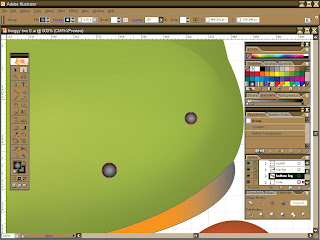
-froggy nose (gradient tool, basic shapes)-

-froggy leg (brush tool, pen tool, mesh tool)-

-froggy leg (pen tool, mesh tool)-

-froggy mouth (gradient tool, pen tool)-

-froggy black eye (radial gradient tool, pen tool)-

-froggy red eye (gradient linear tool, pen tool)-

-the complete whole froggy-


--------------------------------------------------------------------------------
4) GREEN LEAF (BACKGROUND)

- I make a sketch on the leaf by using pen tool...
- Then, I used the mesh tool to make the colour more unique...
- Adjusting the colour to show some shadow for it...


-Leaf Sketch-

-using mesh tool to edit the background colour-

-mesh tool and pen tool for the middle part-

-other branches also using mesh tool-

-complete leaf-


--------------------------------------------------------------------------------
5) COMBINATION

- I put the frog on top of the leaf by making the layer to be at the top of the leaf...
- By combined both the layer, the job is almost completed...
- then, need to attach also the symbol from the 1st assignment...
- the symbol must be placed at the bottom right corner of the image...


-frog on top of a leaf-

-the frog symbol (based on assign 1)-

-symbol at the bottom right corner of the image-

-----------------------------------------------------------------------------------
6) COMPLETED

- finally this sticky frog sat on the leaf were done! :D

-COMPLETED FROGGY STICKY TO THE LEAF-

Monday, August 18, 2008

Froggy Half-Way

Dear My Work Station,

I've completed in creating this green froggy...
I used the reference to make the sketches..
Then, I used the 'Eyesdropper Tool' to mismatch the colour of the frog with the original one...
but this is not the totally and fully completed of the frog..
I need to adjust the colour, and the skin of this froggy...
So, I just some time to focus for this froggy body to make it look nice and a bit realistic...
Moreover, I want to add on the background by adding a big leave to make the frog stick to it..

-----------------------------------------------------------------------------------
-Progress-


-Froggy Sketches-


-Sketch based on the reference-


-Using the eyedropper tool to put the colour for it-


-After finishing inserting colour-


Thursday, August 14, 2008

Assignment 2 Progress

Dear My Work Station,

Here're some of my progress of trying to make this froggy...
I did a lot of layer 1st to make it looks variety...


-sketch in illustrator-

Reference Approved!

Dear My Work Station,

Before the Midterm Break I approach Madam Ling with the type of frog that I want to do it...
So, she agreed for me to do this frog as my reference and guide for this assignment 2...
Eventhough it looks hard to make the skin looks glossy, but I will try to do my best...

-sketch-


-Green Froggy-

Assignment 2 Just Begun!

Dear My Work Station,

Here's are some of my reference that I searched to make my froggy looks realistic..
So, I've decided to make the last one as my reference after I already consult it with Madam Ling before the mid break!


-I choosed this one as the best one!-


-other reference-

-other reference-


Sunday, August 3, 2008

Pentool Exercise

Dear My Work Station...

Yesterday I already submitted my task regarding the exercise in using Pen Tool...
Mdm Ling gave us some clip arts for us to choose just 1 only...
We need to make it as same as the original one..
the purpose of this exercise is to make us more familiar and easy to get use with the Pen Tool...
So, here below is my work that I submitted to her ftp on Friday (1st Aug 08)...
but I guest I need to have more practice for it since my pen tool not as smooth as the original one..hehe...
:)


-Original Sharks-


-My Sharks-


Wednesday, July 23, 2008

Froggy Fully Description

---Safe Frogs!---


-Froggy Symbol-

Description

Frog Extinctions Linked To GLOBAL WARMING!

Frog is one of the amphibians’ species that become extinct due to the Global Warming. The frog died due to their sensitivity skin to heat and also water lost on their skin. Many ‘Harlequin Frog Species’ (Atelopus) across Central and South America have disappeared due to deadly infectious diseases spurred by changing water and air temperatures. So, frogs really need human help to safe and protect them from harm.


Short Cut Understanding
FROGS keep on instinct day by day due to Global Warming!
So, we need to protect them from harm!
NO frogs, NO Rain! :)

--------------------------------------------------------------------------------------


-Behind the Froggy Symbol-


Shape & Colour Meaning


A Drop of Water
Means: Frog needs water to avoid water loss on its skin
Colour: Blue (stands for colour of the water)

Leaves
Means: To show their specific place to live like the bushes
Colour: Green (stands for colour of the leaves or bush)

Frog Skin
Means: The skin is sensitive to the changes of the temperature & water quality
Colour: Green (stands for colour of the frog)

A Hemisphere Glass
Means: The place where all frogs live (Earth – in forest)
Colour: Blue (stands for colour of the earth)

The Eyes
Means: The frogs need attention from people to help them
Colour: Black & White (stands for peace & harmony)

Froggy Fully Step-By-Step

-Step1-

- I create the basic shape for the eyes and also the body of the frog
- I used basic shape for the eyes and using pen tool for the water drop shape
- I combined the eyes and the body of the frog using path finder tool


-Step2-

- I make the leaves and nose also using pen tool
- I select all 4 leaves to make it into 1 group by grouping them


-Step3-

- I'm using the path finder to make the glass at the outer part of it
- I combined 2 oval shape; then I group them together; after that I'm using the divide tool for it and at the end I un-group back the shape and move them piece by piece...

-Step4-

- I started to put colour for the object
- I used the basic colour 1st as the starter


-Step5-

- I start adjusting the colour using the gradient tool
- I'm using the graphic style tool to change the type of medium that the object refers to..(eg: water drop - I'm applying water style for it)
- The outline of the object, I applied the brush tool to make it look more sharp and nice to see


-Step6-

- I make the reflection of the drops using the pen tool
- I adjust the transparency for it to make it suite
- The gradient and the graphic style also I edit a little bit to make it look glossy


-Step7-

- I make the eyes colour adjustment by editing the gradient for it to look the mix of the colour black and white
- I make the last touch up for the froggy to make the colour looks good


-Step8-

- I group the necessary object into one group and rename all the layer to make it easy to recognize
- The sketch at the top left I used as my reference to avoid me out of track...
- The final output I convert it to .png file...


Thursday, July 17, 2008

Assignment 1 - Presentation (In Class)

Dear My Work Station,

I'm in class right now...
Mdm Ling asked us to upload our .PNG file for our symbol..
Just waiting to be call for the presentation...
:(